
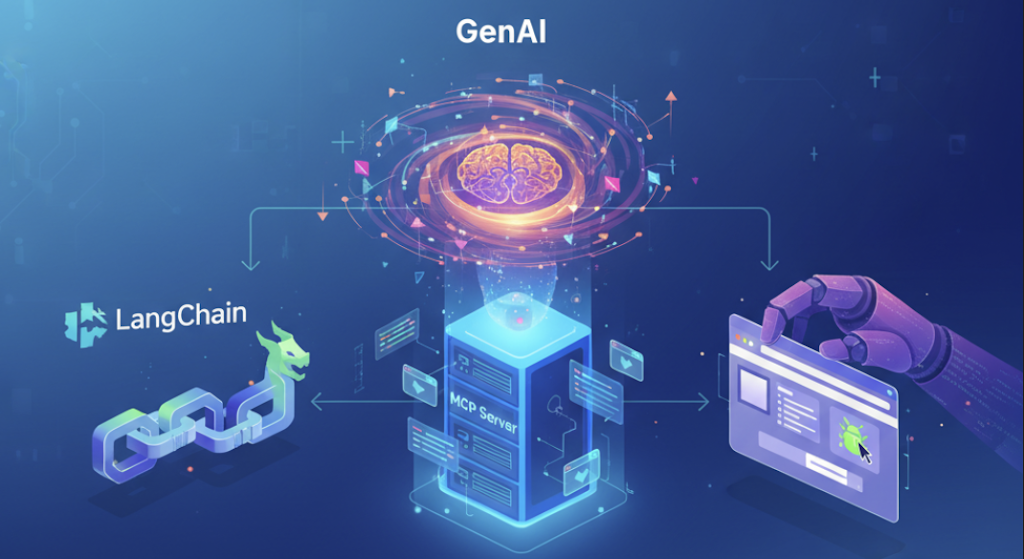
Building a Gemini-Powered Browser Agent with LangChain and the Playwright MCP Server
Web automation has evolved. We’ve moved from writing rigid, brittle CSS selectors to a world where we can simply tell an AI: “Go to Hacker News and give me the top headline.”
With the release of the Model Context Protocol (MCP) and the official @playwright/mcp server, we can now connect LLMs to a real browser. In this post, we will build a TypeScript-based agent using LangChain and Google Gemini LLM to perform web tasks. This concept of building playwright agent can be used for variety of taks e.g. web/UI application testing, scraping content, Automating web navigation tasks etc.
The Tech Stack
- TypeScript: For type-safe development.
- LangChain: The orchestration framework for the “Agentic loop.”
- @playwright/mcp: The official Microsoft-maintained MCP server that exposes browser controls as tools.
- Google gemini-2.5-flash: The “brain” using the
@langchain/google-genaiintegration.
Project Setup
If you want to follow along this article and dive into code directly, please clone the Github repository: https://github.com/suryakand/playwright-mcp-langchain
1. Initialize the Project
First, create your directory and initialize the Node.js environment:
mkdir playwright-mcp-langchain
cd playwright-mcp-langchain
npm init -y
2. Install Dependencies
We will use tsx to run our TypeScript code and the Google GenAI integration for LangChain.
npm install langchain @langchain/google-genai @modelcontextprotocol/sdk zod dotenv
npm install -D typescript tsx @types/node
3. Configure the Environment
Create a .env file in the root directory. You can get an API key for free (within quota limits) at Google AI Studio.
GOOGLE_API_KEY=your_gemini_api_key_hereEnsure your package.json includes "type": "module".
The Implementation
We will use the ChatGoogleGenerativeAI class and the createToolCallingAgent helper, which is the standard way to handle tool interactions with Gemini.
The Agent Logic (src/index.ts)
import "dotenv/config";
import { Client } from "@modelcontextprotocol/sdk/client/index.js";
import { StdioClientTransport } from "@modelcontextprotocol/sdk/client/stdio.js";
import { DynamicStructuredTool } from "@langchain/core/tools";
import { ChatPromptTemplate, MessagesPlaceholder } from "@langchain/core/prompts";
import { createAgent } from "langchain";
import { ChatGoogleGenerativeAI } from "@langchain/google-genai";

// 1. Setup MCP Client Transport
// We run the playwright server using npx
const transport = new StdioClientTransport({
  command: "npx",
  args: ["-y", "@playwright/mcp@latest"],
});

const mcpClient = new Client(
  { name: "langchain-client", version: "1.0.0" },
  { capabilities: {} }
);

async function run() {
  await mcpClient.connect(transport);

  // 2. Fetch available tools from the Playwright MCP Server
  const { tools: mcpTools } = await mcpClient.listTools();

  // 3. Convert MCP tools to LangChain compatible tools
  const langchainTools = mcpTools.map((tool) => {
    return new DynamicStructuredTool({
      name: tool.name,
      description: tool.description || "",
      schema: tool.inputSchema as any,
      func: async (input) => {
        const result = await mcpClient.callTool({
          name: tool.name,
          arguments: input as any,
        });
        return JSON.stringify(result.content);
      },
    });
  });

  // 4. Initialize LangChain Agent
  const llm = new ChatGoogleGenerativeAI({
      model: "gemini-2.5-flash",
      temperature: 0,
      maxRetries: 2,
      // other params...
  })

  const prompt = ChatPromptTemplate.fromMessages([
    ["system", "You are a helpful web automation assistant. Use the browser tools to complete the user's request."],
    ["human", "{input}"],
    new MessagesPlaceholder("agent_scratchpad"),
  ]);

  const agent = await createAgent({
    model: llm,
    tools: langchainTools,
    // prompt,
  });

  // 5. Execute Action
  const instruction = "Search Google for 'LangChain MCP' and tell me the title of the first result.";

  console.log(`Starting task: ${instruction}`);
  const response = await agent.invoke({ messages: instruction });
  console.log("\nFinal Result:", response.messages);

  process.exit(0);
}

run().catch(console.error);
Why Use Gemini for Browser Automation?
- Massive Context Window: Browser pages can be incredibly “noisy” with thousands of lines of HTML. Gemini 1.5’s 1-million+ token context window allows it to process entire page structures without aggressive trimming.
- Multimodal Capabilities: Since Gemini is natively multimodal, you can extend this agent to “look” at the screenshots taken by Playwright to navigate visually heavy websites that lack clear metadata.
- Cost Efficiency: Gemini 1.5 Flash is significantly cheaper (and often faster) than GPT-4o for the high-frequency tool calls required during web navigation.
Running the Agent
To execute your agent, run:
npx tsx src/index.tsYou will see the terminal output the agent’s “Thought” and “Action” chain. It will call playwright_navigate, read the page content, and then extract the requested titles.
New Updates (Feb 01, 2026)
- Factory Pattern: Clean, extensible architecture for LLM provider management using
LLMFactoryand.envfile (see below example configurations) - Multi-LLM Support: Easily switch between Google Gemini, Anthropic Claude, OpenAI, and Azure OpenAI
Read more about how LLM Factory helps swapping LLM/models just by changing configurations. https://suryakand-shinde.blogspot.com/2026/02/streamline-your-ai-development-power-of.html
Google Gemini (Default)
LLM_PROVIDER=google-gemini
LLM_MODEL=gemini-2.5-flash
LLM_TEMPERATURE=0
GOOGLE_API_KEY=your_api_key_here
Anthropic Claude
LLM_PROVIDER=anthropic
LLM_MODEL=claude-3-5-sonnet-20241022
LLM_TEMPERATURE=0
ANTHROPIC_API_KEY=your_api_key_here
OpenAI
LLM_PROVIDER=openai
LLM_MODEL=gpt-4o
LLM_TEMPERATURE=0
OPENAI_API_KEY=your_api_key_here
Azure OpenAI
LLM_PROVIDER=azure-openai
LLM_MODEL=gpt-4o
LLM_TEMPERATURE=0
AZURE_OPENAI_API_KEY=your_api_key_here
AZURE_OPENAI_ENDPOINT=https://your-resource.openai.azure.com/
AZURE_OPENAI_DEPLOYMENT_NAME=your-deployment-name
AZURE_OPENAI_API_VERSION=2024-02-15-preview
Conclusion
By combining AI Capabilities with the Playwright MCP server, you have built a browser-based worker that can reason, navigate, and extract data from the live web. This setup is perfect for automated research, price monitoring, or testing web applications using natural language.
Happy hacking! 🤖🌐